Post ideas · Google Business Profile · by goal
30 Google Business Profile post ideas, grouped by what the post is for
Six rendered example posts first, then 30 ideas grouped by the goal the button serves: calls, directions, offers, updates and events, with a cadence table by post type and a what-to-post-this-week checklist.
Six Business Profile posts, as they would read on the listing
Each card shows the feed post on top and, underneath, the one-line summary and button the same post would carry on a Business Profile listing. The six are six different demo businesses.
Mile High Tidy
Demo brand
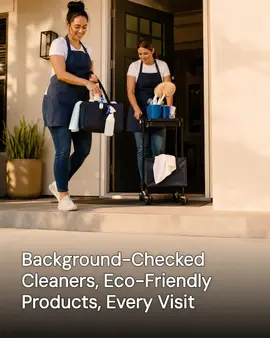
Same-day cleaning, as of 8am: two crews out and one afternoon slot left. Call now and we'll tell you straight if we can make it.
Button: Call now
The hero, as the generator produced it for a cleaning company. Real generator output for Mile High Tidy, a demo brand we built ourselves to show a trade we have no customer in yet.
Copperline Plumbing
Demo brand
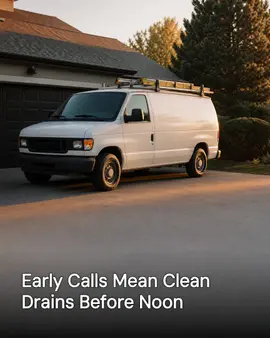
Calls
The emergency line is answered until 9pm, seven days. After that, leave a message and we call back by 7am.
Button: Call now
One demo brand per goal, below. Real generator output for Copperline Plumbing, a demo brand we built ourselves to show a trade we have no customer in yet.
Chicory Bend Coffee
Demo brand
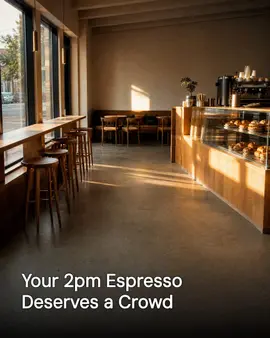
Directions
Right now the corner room is open and quiet. Come in the side door by the patio; the front door is locked after 3.
Button: Directions
One demo brand per goal, below. Real generator output for Chicory Bend Coffee, a demo brand we built ourselves to show a trade we have no customer in yet.
Thistle & Fern Florals
Demo brand

Offers
This week only: a hand-tied bouquet, wrapped for same-day delivery, at the counter price. Ends Sunday.
Button: Book
One demo brand per goal, below. Real generator output for Thistle & Fern Florals, a demo brand we built ourselves to show a trade we have no customer in yet.
Northwind Heating & Air
Demo brand

Updates
New: smart thermostat installs, mounted and programmed in the same visit. Ask what it changes when you call.
Button: Learn more
One demo brand per goal, below. Real generator output for Northwind Heating & Air, a demo brand we built ourselves to show a trade we have no customer in yet.
Riverbend Neighbors Project
Demo brand

Events
Community day this Saturday, 10 to 2, under the canopy. Sign in at the folding table and grab a plate.
Button: Learn more
One demo brand per goal, below. Real generator output for Riverbend Neighbors Project, a demo brand we built ourselves to show a trade we have no customer in yet.
Where a Business Profile post shows up, and why that changes what you write
Picture a customer on your Business Profile, thumb over the call button. They have two seconds to decide. They already searched for you, or they are on your Maps listing choosing between calling and walking in, so the post has one job: answer the question they came with and hand them a button to act on it.
A Business Profile post is three things and nothing else: a summary line, one photo, and one button. The summary is capped at 1,500 characters, but only the first line or two shows before the reader taps for more, so the thing that matters goes first. The photo is what makes the post stand out on a listing that is otherwise plain text.
There are three post types. An Update is a plain post. An Offer adds a coupon field and an end date, and an Event adds a start and an end date. The thirty ideas below are grouped by what the post is for, and every one names the button to pick.
6 posts that get the phone to ring (6 ideas)
Someone on your listing is one tap from calling. These posts remove the two reasons they don't: they are not sure you will pick up, and they are not sure what it costs to ask.
The question we answered three times yesterday: 'Can you fit me in this week?' Here is the real answer for this week, with the days that still have room.
Button Call nowPhoto The person who answers the phone, at the desk, mid-call.Same-day calls, as of this morning: two slots left this afternoon. If you are reading this after they are gone, the next open day is Thursday.
Button Call nowPhoto The open appointment book with today's page showing.Our emergency line is answered until 9pm, seven days. After that, leave a message and we call back by 7am. Here is what counts as an emergency, and what can wait until morning.
Button Call nowPhoto The van at dusk, or the phone on the desk with the hours written beside it.The job people ask the price of most, with a real number: what it starts at, the two things that move it, and how long it takes. Better you know before the call than after.
Button BookPhoto That job in progress, the messy middle rather than the finished result.Before you call, have these three things ready: the make and model if there is one, a photo of the problem, and your address. It turns a five-minute call into a one-minute call.
Button Call nowPhoto A hand holding a phone with a photo of the problem on screen.The thing every first-timer worries about: 'Will someone show up and hand me a surprise bill?' Here is exactly how we quote, when you pay, and what happens if the fix is smaller than we thought.
Button Call nowPhoto A signed quote or a work order, close enough to read the total.
6 posts that get someone through the door (6 ideas)
A customer who found you on Maps still has to physically find the door. These posts remove the small frictions that send them to the shop next door.
Parking: the lot behind the building is ours, the spots are marked with our name, and the first hour is free. The meters out front are not ours, and they ticket fast.
Button DirectionsPhoto The parking lot from the street, with the entrance visible.The door you want is on the side, not the one facing the street. Look for the blue awning; the front door is locked and leads to the upstairs offices.
Button DirectionsPhoto The side entrance from across the street, the awning in frame.Walk-ins are welcome Monday to Friday, 9 to 4, no appointment. Outside those hours we are on the road, so call first and we will meet you.
Button DirectionsPhoto The open front door with the hours sign visible.The quiet hour is 2 to 3pm. If you want to talk without a line behind you, that is the window. Mornings and 5pm are the rush.
Button DirectionsPhoto The empty waiting area in afternoon light.This is what we look like from the street: the grey building next to the bank, our sign over the door, the coffee shop across from us. If you drove past, you were close.
Button DirectionsPhoto The storefront shot from the street, straight on.Holiday hours, posted before you need them: closed Monday, open Tuesday 10 to 2. We will repost if anything changes.
Button DirectionsPhoto The door with a printed hours sheet taped inside the glass.
6 posts that make an offer worth the tap (6 ideas)
An Offer post carries a coupon and an end date. The rule for all six: a special with no end date is an Update, not an Offer, so give every one a date.
A dated special: name one service, one price, and one end date, then stop. The end date is what makes it an Offer instead of an Update.
Button BookPhoto The service in progress, with a simple price card beside it.A first-visit price for new people only: one service at a number you can afford to give away once, because the point is the second visit.
Button BookPhoto A new arrival's first appointment, the handshake or the sign-in.A bundle: two services that always go together, priced as one. It moves the bigger job and reads as a deal without discounting the thing you would rather not.
Button BookPhoto The two services side by side, or the finished bundle in one shot.A referral thank-you: name the reward for the person who referred and the one who got referred. The 'both of you' is the whole offer.
Button Learn morePhoto Two people at the counter, or the reward itself on the desk.An end-of-season clearance: the service or product about to go quiet, priced to clear. It works because the urgency is real, not invented.
Button Learn morePhoto The shelf or the stock you are clearing, before it is gone.A service-plan sign-up: the maintenance agreement, with what it covers and what it costs, as an Offer. The end date is the sign-up window.
Button Learn morePhoto The agreement, or a checklist of what is included.
6 posts that tell people what changed (6 ideas)
An Update is the plain post, the workhorse. These six are the changes worth announcing: they answer what is new and whether you can still do the thing the reader needs.
New: we now offer a service people have asked for enough times that we added it. Here is what it includes and who it is for.
Button Learn morePhoto The new service being done for the first time, or the sign going up.Meet the new person on the team, and the one thing they are best at. If you call this month, there is a good chance they are the one you talk to.
Button Learn morePhoto The new person at the door or the desk, not posed, mid-task.New van on the road, which means we can now get to the far side of town the same day instead of next week.
Button Learn morePhoto The van or machine, parked or in use, with the name visible.This job started as a small leak and turned into a full replacement. Finished today, and the only thing that changed for the customer is the water pressure.
Button Learn morePhoto The finished job, with the before photo beside it or inset.A policy change, said plainly: we now take a new payment method, and here is exactly how it changes the way you pay or book.
Button Learn morePhoto The new payment terminal or the booking screen.A review said we were hard to reach on Fridays. Fair. We added a second person on the phone, and here are the new Friday hours.
Button Learn morePhoto The phone or the desk, staffed, with the new hours in view.
6 posts for a date on the calendar (6 ideas)
An Event post has a start and an end. These six put a real date on the calendar and a reason to show up; the button and the date field do the work.
Open house, this Saturday from 10 to 2. Tour the shop, meet the team, and ask the question you have been saving. Free, no appointment.
Button Learn morePhoto The space set up for people, chairs out, door open.A free class, this Thursday at 6. We show you the thing, you try it, and you leave knowing more than you came with. Space is limited.
Button Learn morePhoto The class setup, materials laid out on a table.Community day, all day Sunday. We are grilling, giving things away, and the whole block is invited. Come meet the neighbours.
Button Learn morePhoto The storefront with a banner or a table out front.The seasonal service window opens next week and closes at the end of the month. Book inside the window, because after that it is off the menu until next year.
Button BookPhoto The seasonal service being done, or the calendar with the window marked.A charity drive: we are collecting for a local cause until the end of the month. Drop off during open hours, and we will match the first ten.
Button Learn morePhoto The collection box, or the team loading donations.Closed next Monday for staff training, back Tuesday at 8. Emergencies still get the emergency line; everything else waits one day.
Button Learn morePhoto A closed sign, or the team in the training room.
How often to post, by post type
Practical counts, not targets, and no performance claims. The expiry column states the real behaviour: an Update archives after six months unless a date range is set, an Offer ends on its end date, and an Event ends after the event.
| Post type | Suggested cadence | Expires | Photo | Button | Goal group |
|---|---|---|---|---|---|
| Update | 2 to 3 a week | After 6 months | One job photo | Learn more | Updates |
| Offer | 1 to 2 a month | On the end date you set | The thing on offer | Book | Offers |
| Event | As events come | After the event ends | The venue or the flyer | Learn more | Events |
| Hours change | The day they change | After 6 months (the hours field itself stays until you change it) | The door with the new hours | Directions | Updates |
| Finished-job photo | 1 a week | After 6 months | The before and after | Call now | Calls |
What to post this week
The free plan on this site generates one campaign a week: three posts, one short video and one cross-post. Use the three posts for the groups below; the video and the cross-post go to your other channels, because the Business Profile post this product sends carries one photo.
- Calls: post the answer to this week's most-asked question, with a Call now button.
- Directions: if parking or the entrance ever confuses people, post it with a Directions button.
- Offers: post one dated offer if you have a real one this week; no end date means it is an Update, not an Offer.
- Updates: post one finished job or one thing that changed, with a photo.
- Events: if something is on the calendar, post it as an Event with a start and end; otherwise fold the slot into another Update.
Post it from one place
SpeedRun Social reads your website into a brand kit, then writes the summary and generates the photo for each Business Profile post in your company's voice, with a week's goals as the brief. Every post waits in an approval queue until somebody at the shop taps approve, and the approved week schedules itself to Instagram, Facebook, LinkedIn, X (Twitter), TikTok, YouTube, Threads, Pinterest, Bluesky, Google Business Profile, and WordPress.
The free plan is 300 credits a month and one free campaign a week (3 posts, 1 video, 1 cross-post) to start, then free with no end date for light use, no card, watermarked media on free. Paid plans are $49.99, $99.99 and $199.99 a month.
Try the free Business Profile post generator without an account, or see real generated output.
Questions people ask about Google Business Profile posts
What are Google Business Profile posts?
Short updates that appear on your Business Profile in Google Search and Maps: a summary line, one photo and a button. There are three kinds. An Update is a plain post, an Offer adds a coupon field and an end date, and an Event adds a start and an end date. They are how a listing shows something current without sending the reader to your website first.
What should I post on my Google Business Profile?
Post the thing someone looking at your listing needs right now: the answer to this week's most-asked question, how to park and find the door, one dated offer, and what changed (a new service, a finished job, new hours). The 30 ideas above are grouped by what the post is for.
How often should I post on Google Business Profile?
A floor of two or three updates a week, plus an offer when there is a real one and an event when there is one on the calendar. Steady beats bursty: a listing with a few recent posts beats one that posts daily for a month and then goes dark. The cadence table above gives the split by post type.
How long does a Google Business Profile post stay up?
An Update stays on the listing and is archived after six months unless a date range is set on it. An Offer ends on the end date you give it, and an Event ends after the event. The six-month figure comes from Google's own help page (support.google.com/business/answer/7342169), checked September 9, 2026.
Do Google Business Profile posts help local SEO?
They keep your listing current, which is one of the signals Google reads, but we make no ranking promise and neither should anyone else. What a post reliably does is give someone who already found your listing a reason to call or come in. That is the honest return, and it does not need a ranking claim to matter.
What size image does a Google Business post need?
Google does not publish one required size the way some platforms do, so we do not invent one. What a post here ships is a single photo attached to the post, served from an https URL, with the summary text capped at 1,500 characters. Use a clear, square-ish photo that still reads at thumbnail size; treat that as guidance, not a Google spec.
Can I schedule Google Business Profile posts?
Yes. You can schedule a post when you create it in Google, and this product generates a week and publishes to the Business Profile on a schedule alongside your other channels, after you approve each post. Nothing publishes until you release it.
Are Google My Business and Google Business Profile the same thing?
Yes. Google renamed Google My Business to Google Business Profile in 2021. It is the same listing, the same free tool and the same posts under the newer name, so the two phrases are interchangeable.