For hvac pros
Social media marketing for hvac pros
What does social media marketing for HVAC pros need every week? Three photos the techs already take: the clean changeout, the filter nobody replaced since spring, the tune-up customers forget to book. SpeedRun Social turns each into a captioned, illustrated post and holds it for your approval. The free plan is one campaign a week, every week, no card.
No account, no email, no card. One post from your own website.
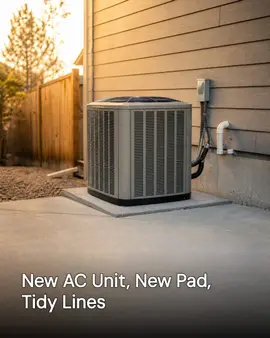

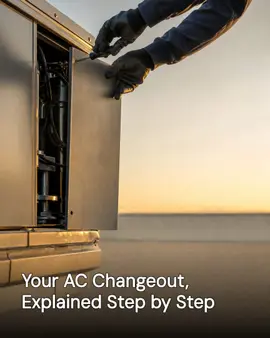
Real generator output for Northwind Heating & Air, a demo brand we built ourselves to show a trade we have no customer in yet.
Free every week: 3 posts, 1 video, 1 cross-post. No card, no trial clock. Free media carries a small watermark.
Why a HVAC company's social media goes quiet
Not a discipline problem. A time-of-day problem.
- The calendar runs on two peaks. When the heat hits, nobody has time to post; when the weather is mild, nobody has anything urgent to say.
- Techs shoot the model plate for the file and the paperwork for the office, and never the clean install two feet away.
- The photo that would sell the next changeout gets taken for the warranty folder, cropped to the serial number, and never seen again.
- Maintenance agreements are the steadiest money in the business and the least photographed thing in it.
- Fall tune-up season arrives on a date the company knows months ahead, and the posts about it still get written the week the furnaces start failing.
What it does for a HVAC company
Shipped features, described the way they land for your week.
Your website is the setup
Hand SpeedRun your web address and it imports the business details, the colors, the services you list, and the images on the page. If your site sells heat pumps and duct sealing, the first drafts do too.
Five pieces a week, free
Every week the free plan includes three image posts, one short video, and one cross-post. An HVAC week might be a changeout, a filter comparison, a clip from the attic, and a cross-post walking through what a tune-up covers.
One voice across two seasons
The brand kit stores your company name, your tone, and what you want to be known for, and every caption comes out of it, written per platform. Cooling season and heating season change the topic, never the voice.
Images built from your installs
Generated images are built around what you upload: the finished condenser pad, the new air handler in the closet, your logo and colors. Nobody's stock photo of somebody else's equipment stands in for your work.
The queue waits for you
Posts sit in an approval queue until someone taps approve. Fix a caption, swap an image, slide a post to the week the weather turns, or reject it. Clearing the queue fits between service calls.
Eleven destinations, one schedule
Connect Instagram, Facebook, LinkedIn, X (Twitter), TikTok, YouTube, Threads, Pinterest, Bluesky, Google Business Profile, and WordPress. One schedule feeds all of them.
How to run an HVAC company's social media
These are post shapes, not theory: five kinds of post an HVAC company can build in any week of the year, each with the photo it needs.
What you need
- A phone with a flash, because half your photos happen in attics and mechanical closets.
- A one-line rule for techs: shoot the finished install before the tools go back in the truck.
- The dates your seasons actually turn in your area, written down: first heat, first freeze, tune-up windows.
- Homeowner permission for any photo taken inside the house, asked at the door.
Run the changeout post: old unit out, new unit in
The dead system sitting on the curb tells the story the shiny one cannot. Photograph the old unit before the haul-away and the new install after startup, and let the caption say the age of what came out. The pad, the lineset, and a disconnect mounted straight are what another homeowner actually studies.
Make the filter photo a recurring post
A clogged filter next to a clean one is the most understood image in your trade, and homeowners forget it every ninety days anyway. It costs a tech ten seconds on a maintenance call and it gives the page a post that never runs out of season.
Write the season-flip week before the season flips
You know within a week or two when the first heat wave and the first freeze land in your area. Build the tune-up posts for the shoulder weeks before them, when a homeowner can still book ahead of the rush instead of calling from inside it.
Give the maintenance agreement its own post
Agreements are renewals, priority scheduling, and the spring and fall visits, and most companies never explain them anywhere a homeowner reads. One plain post laying out what a membership visit includes, shot over a tech's shoulder at a coil, earns its slot every month.
Answer the question the last customer asked
Why is the upstairs hotter than the downstairs, and what is that noise the unit started making. Every service call hands you one of these, and a two-minute video of a tech answering it in plain words is the easiest post of the week.
Common mistakes
- Posting nothing all summer because the board is full, then posting daily in October to a page that sat dead for months.
- Shooting the equipment and never the house around it, so every post is the same beige box on a pad.
- Saving the tune-up reminders for the first cold week, when the customers who needed them are already on hold.
- Letting the brand of the unit be the caption. The homeowner hired your company, not the manufacturer.
What the free plan gives a HVAC company
One campaign a week, generated and scheduled, with no card and no trial clock. Media on the free plan carries a small watermark; paid plans remove it.
- 3 image posts
- 1 short video
- 1 cross-post
- 300 credits a month
Questions hvac pros ask
What are good social media post ideas for an HVAC company?
The ones on this page: the changeout pair, the filter comparison, the season-flip tune-up post, the maintenance agreement explainer, and a tech answering a common customer question on video. SpeedRun turns each into a finished post, and the free weekly campaign gives you five pieces of content a week to spend on them.
Do we need different posts for cooling season and heating season?
The topics change and the voice should not. Your brand kit holds the voice, the campaign angle you pick carries the season, and you can edit any caption in the approval queue before it publishes, so a cooling draft never runs into a cold snap by accident.
Our techs are terrible photographers. Does that matter?
Less than you would think. Generated images are built around the photos you upload, phone shots included, and setup can import the images already on your website. A straight shot of a finished install is enough to build a post on.
Does it connect to our dispatch or field service software?
No. SpeedRun Social does not connect to dispatch, field service, or scheduling software. Photos and details come from what you upload and from your own website at setup, and the posting schedule you set inside SpeedRun is its own.
What does the free plan include?
The free plan costs nothing and does not ask for a card. It includes 300 credits a month and one free campaign a week, and media generated on the free plan carries a small watermark. Paid plans add credits and remove the watermark, and you can cancel any time.
Part of
Social media automation for service businesses
hvac social media post ideas, one season at a time
New to the tools themselves? AI social media posting for hvac pros, explained covers what the category costs and where it stops.
Also built for
- Social media marketing for barbers
- Social media marketing for restaurants
- Social media marketing for plumbers
- Social media marketing for landscapers
- Social media posts for dentists
- Social media marketing for roofers
- Social media posts for countertop shops
- Social media for real estate agents
- Social media marketing for electricians
- Social media post ideas for gyms
- Social media for cleaning businesses
- Social media posts for hair salons
- Social media marketing for med spas
- Social media marketing for auto repair
- Social media marketing for law firms
- Social media marketing for pest control
- Social media marketing for veterinarians
- Social media ideas for nail salons
- Social media for nonprofits
- Social media for photographers
- Social media marketing for chiropractors
- Social media for general contractors
- Social media posts for painters
- Social media for accountants
- Social media ideas for coffee shops
- Social media posts for car detailers
- Social media marketing for tattoo studios
- Social media for bars and breweries
- Social media content for bakeries
- Social media marketing for yoga studios
- Social Media for personal trainers
- Social media marketing for pet groomers
- Social media posts for florists
- Social media for boutiques
- How SpeedRun Social works
See a week built around your season
Point it at your website, read the drafts it writes, and approve them between service calls. The weekly campaign is free and takes no card.