For nonprofits
Social media for nonprofits
Social media at a nonprofit passes between a program director, an intern, and whichever volunteer answered last, because nobody was hired to run it. SpeedRun Social gives that rotating cast one system: it reads your website, writes captions in your organization's voice, generates the media, and queues each week for sign-off. The free plan covers a campaign every week.
No account, no email, no card. One post from your own website.
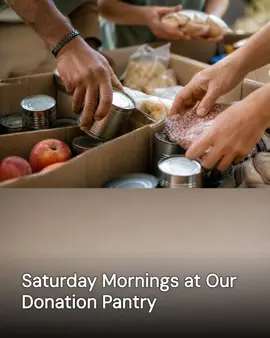

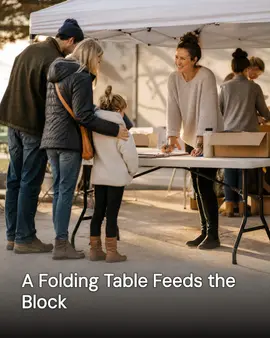
Real generator output for Riverbend Neighbors Project, a demo brand we built ourselves to show a trade we have no customer in yet.
Free every week: 3 posts, 1 video, 1 cross-post. No card, no trial clock. Free media carries a small watermark.
Why a nonprofit's social media goes quiet
Not a discipline problem. A time-of-day problem.
- The communications job belongs to whoever has a spare hour, and a grant deadline eats every spare hour in the building.
- Each program keeps its own login and its own idea of the mission, so the organization posts like four unrelated groups.
- Donors hear from you twice a year, and both times the message is an ask.
- The gala takes six months to plan and gets announced online nine days before the date.
- Volunteers who would gladly share a post never get one to share, because posting stopped when the last coordinator left.
What it does for a nonprofit
Shipped features, described the way they land for your week.
Your website teaches it the mission
Give SpeedRun your web address and it imports your organization's details, your colors, the programs you list, and photos from the page. Drafts arrive naming the food pantry and the tutoring program instead of gesturing at good causes in general.
The weekly campaign costs the budget nothing
Every week the free plan includes a campaign of three image posts, one short video, and one cross-post. For a nonprofit that can be a program update, a volunteer thank-you, a clip from a site day, and a cross-post carrying the next event.
The voice survives the handoff
The brand kit holds the tone, the reading level, and the words your organization uses for the people it serves. Captions come out of it, one written per platform, so the page reads the same in October as it did in March, whoever was posting each month.
Built from your programs' own photos
Generated images are built around what you upload: the site day, the sorting table, your logo and colors. Setup can pull the photos already on your website, and nothing starts from a stock image of strangers pretending to volunteer.
Approval sits with whoever you name
Every post waits in a queue until a person you named signs off. That is where a beneficiary photo gets checked against the consent on file and a program detail gets corrected before the whole donor list sees it. Edit, swap the image, reschedule, or reject.
One schedule, from supporters to funders
Connect Instagram, Facebook, LinkedIn, X (Twitter), TikTok, YouTube, Threads, Pinterest, Bluesky, Google Business Profile, and WordPress. Facebook and Instagram reach supporters, LinkedIn is where funders look an organization up.
How to run a nonprofit's social media
Four habits, one per audience: the volunteers who post, the donors who read, the crowd an event needs, and the people the organization serves.
What you need
- A one-page voice note the next volunteer can post from without asking anyone.
- Consent forms, signed, for anyone your programs serve who appears in a photo.
- Every account login in one shared place, so the page outlives a coordinator's tenure.
- The event dates for the next quarter, tentative ones included.
Write the voice down before the next handoff
The account will change hands again at the end of a semester or a grant cycle. A one-page note, what the organization sounds like, the words it uses for the people it serves, what it never posts, keeps ten different posters reading as one organization. Without it the page changes personality every time a coordinator moves on.
Send the donor update that asks for nothing
A donor who only hears from you in December hears a bill. One short update a month, what the program did, who showed up, what a gift paid for, makes the year-end appeal read as a continuation rather than an ambush. Keep it free of any ask, and queue it whether or not a campaign is running.
Push the event three times, not once
A post published the week of the event reaches people whose plans are already set. Announce when the date is fixed, remind when registration opens, and push in the final week. The same event written three ways is not repetition; each pass reaches the supporters the last one missed.
Let the people you serve decide whether they appear
A before-and-after works for a kitchen remodel and not for a person. Collect written consent before anyone your programs serve appears on the page, take the no as easily as the yes, and when in doubt photograph the work instead: the hands, the boxes, the site, the room being set up.
Common mistakes
- Posting only when the organization needs something. Supporters learn to scroll past the logo.
- Letting every program run its own page in its own voice, which makes one organization look like a loose coalition.
- Announcing the event once, in the week it happens.
- Publishing a moving photo of someone the organization serves without the consent on file. Moving is not the same as permitted.
What the free plan gives a nonprofit
One campaign a week, generated and scheduled, with no card and no trial clock. Media on the free plan carries a small watermark; paid plans remove it.
- 3 image posts
- 1 short video
- 1 cross-post
- 300 credits a month
Questions nonprofits ask
What should a nonprofit post besides donation asks?
The work between the asks. A program update, a volunteer at the sorting table, the site day, the event announcement, the person joining the board. The free weekly campaign gives you three image posts, one short video, and one cross-post to spend on exactly that, so the ask, when it comes, is not the only thing supporters have heard from you.
Does it connect to our donor database or CRM?
No. SpeedRun Social does not connect to donor databases, CRMs, or fundraising platforms, and it does not read your donor list. Photos and details come from what you upload and from your own website at setup.
Can volunteers run it without breaking the voice?
That is the setup it is built for. The brand kit holds the voice, not the person posting, so captions come out sounding like the organization no matter who generated them. Every post still waits in the approval queue until the person you named signs off, which is how a rotating cast posts without anyone winging it.
Can we post photos of the people we serve?
That decision and the consent gathering stay with your organization. What the product gives you is a second check: every post sits in the approval queue before it publishes, which is where a photo gets compared against the form on file. A full calendar can also run on the work, the site, and your volunteers with no beneficiary photos at all.
Will it write our fundraising appeals?
It drafts social posts from your brand kit. It does not write grant applications or direct-mail appeals, and it is not a source of guidance on how solicitation is regulated where you operate; that question belongs with your own advisor. What goes out on your accounts is whatever you read and approved.
What does it cost to try?
The free plan costs nothing and does not ask for a card. It includes 300 credits a month, refilled every month, and one free campaign a week, which is three image posts, one short video, and one cross-post, with the Brand Kit included. Media generated on the free plan carries a small watermark. Paid plans add credits and remove the watermark, and you can cancel at any time.
Part of
Social media automation for service businesses
social media post ideas for nonprofits
best social media tools for nonprofits, ranked
New to the tools themselves? AI social media posting for nonprofits, explained covers what the category costs and where it stops.
Also built for
- Social media marketing for barbers
- Social media marketing for restaurants
- Social media marketing for plumbers
- Social media marketing for landscapers
- Social media posts for dentists
- Social media marketing for roofers
- Social media posts for countertop shops
- Social media for real estate agents
- Social media marketing for hvac pros
- Social media marketing for electricians
- Social media post ideas for gyms
- Social media for cleaning businesses
- Social media posts for hair salons
- Social media marketing for med spas
- Social media marketing for auto repair
- Social media marketing for law firms
- Social media marketing for pest control
- Social media marketing for veterinarians
- Social media ideas for nail salons
- Social media for photographers
- Social media marketing for chiropractors
- Social media for general contractors
- Social media posts for painters
- Social media for accountants
- Social media ideas for coffee shops
- Social media posts for car detailers
- Social media marketing for tattoo studios
- Social media for bars and breweries
- Social media content for bakeries
- Social media marketing for yoga studios
- Social Media for personal trainers
- Social media marketing for pet groomers
- Social media posts for florists
- Social media for boutiques
- How SpeedRun Social works
Give the next volunteer a system
Connect your organization's website, name the approver, and read the first week it drafts. The free plan takes no card and asks nothing of the budget.