For landscapers
Social media marketing for landscapers
Landscaping social media runs on before-and-after photos, and your crews already take them. Upload the shots, or let setup pull the project gallery off your website; SpeedRun Social writes a caption per platform, generates video, and schedules a week you approve. Nothing to pay for the weekly campaign, and no card.
No account, no email, no card. One post from your own website.
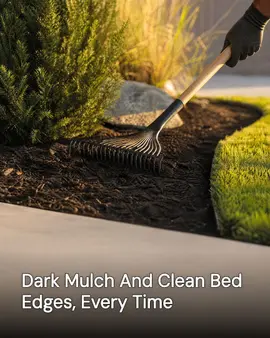
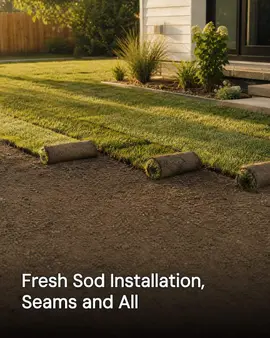
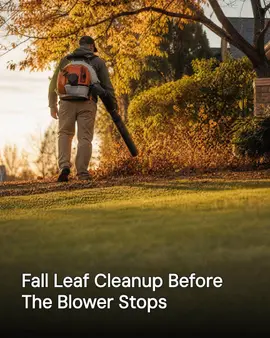
Real generator output for Bluegrass & Birch Landscaping, a demo brand we built ourselves to show a trade we have no customer in yet.
Free to start: one campaign a week of 3 posts, 1 video, 1 cross-post. No card needed. Free media carries a small watermark.
Why a landscaping company's social media goes quiet
Not a discipline problem. A time-of-day problem.
- The best content you will ever have is a before and after, and it is sitting on a crew lead's phone.
- Spring is too busy to post and January has nothing obvious to post about.
- A finished yard looks its best for about a week, and nobody photographs it on the right day.
- Estimates come from homeowners who saw a job two streets over and remembered the name on the truck.
What it does for a landscaping company
Shipped features, described the way they land for your week.
Setup pulls from your site
SpeedRun imports your business details, the services you sell from weekly maintenance to full installs, your colors, and the project photos already on your pages.
A free campaign a week to start
To start, three image posts, one short video, and one cross-post per week at no cost. The cross-post is where a before and after belongs, and the video slot fits a walkthrough of a finished yard shot on a phone.
Design-build and maintenance do not read the same
The brand kit sets your tone and the words you use for your own work, so a design-build company and a maintenance crew come out sounding like themselves. Every platform gets its own caption.
Built on the photos your crews already take
Upload jobsite photos as they are. Generated images are built around them, so the retaining wall in the post is the one you built.
You approve every post
Fix a plant name, swap in a better angle, push a post to a week when the weather cooperates, or reject it. Nothing publishes on its own unless you turn on autopilot.
One schedule across your accounts
Connect Instagram, Facebook, LinkedIn, X (Twitter), TikTok, YouTube, Threads, Pinterest, Bluesky, Google Business Profile, and WordPress. Instagram, Facebook, Pinterest, and Google Business Profile are the usual set for a landscaping company, and one schedule feeds all of them.
How to run a landscaping company's social media
All of it hangs on one habit, and the habit has to start on the morning of the job rather than the afternoon it finishes.
What you need
- One before shot per job, taken before anyone unloads. If it does not exist on day one it never exists.
- A marked standing spot, so the after can be taken from where the before was.
- The homeowner's yes to photograph the property, collected at the estimate.
- A phone and roughly an hour a month.
Take the before shot before the truck is unloaded
This is the whole thing. An after on its own is pretty and sells nobody; the pair is the proof. Stand where the homeowner stands when they walk out the front door, shoot wide, and note the spot.
Come back for the after from the same spot
Same position, same height, similar time of day. A matched pair reads as evidence of what you changed. A pair shot from two different angles reads as two different yards and does nothing.
Shoot the finished yard inside a week
Fresh mulch, cut edges, and new plantings hold their look for a few days. The walkthrough video belongs in that window, before the beds settle and the perennials go leggy.
Sequence the build instead of showing only the end
A retaining wall is base, block, backfill, cap. Four photos taken across the job become a cross-post that explains why the price is the price, and that is the post that survives an estimate conversation.
Publish design work in winter and maintenance in spring
Homeowners plan hardscape in January and buy mowing in April. The install you finished in July is the January post. The crew photo from a spring cleanup is the April one. Shoot in season, publish out of it.
Put the address-free version on the map listing
Google Business Profile is where somebody searching for a landscaper near them lands. Post the same pair there, without the street in frame, so the work sits next to your service area rather than only in a feed.
Common mistakes
- Afters only. Nobody looking at a finished yard can tell what you changed about it.
- Shooting the before from the truck window and the after from the porch.
- Dumping a whole season of photos in one November week and then going silent until March.
- Leaving the house number in frame, or naming the street in the caption.
What the free plan gives a landscaping company
One campaign a week to start, generated and scheduled, then free with no end date for light use, with no card needed. Media on the free plan carries a small watermark; paid plans remove it.
- 3 image posts
- 1 short video
- 1 cross-post
- 300 credits a month
Questions landscapers ask
What do we post in winter?
The season you just finished, plus whatever you sell in the cold months. Before and afters from summer installs, a cross-post walking through a build in stages, snow or holiday lighting if you offer it, and planning content for spring. There are twenty landscaping social media post ideas by month and growing zone on the blog, keyed to what the yard is doing instead of the holiday. The campaign generates year-round; the photos can be from June.
Our crews take photos but nobody edits them.
Upload them as they are. SpeedRun generates the post around your photo and writes the caption. A phone shot of finished work is the input, not something you have to clean up first.
Can it do before-and-after posts?
Yes. The free weekly campaign includes a cross-post, which is the format built to hold a set of images in sequence, and you can swap any image in it before the post publishes.
We are seasonal. Can we stop and start?
Yes. There are no contracts and no cancellation fees, and you keep access through the end of a billing period if you cancel a paid plan. On the free plan there is nothing to cancel.
What does it cost to try?
The free plan costs nothing and does not ask for a card. It includes 300 credits a month and one free campaign a week to start, then the plan stays free with no end date for light use, and media generated on the free plan carries a small watermark. Paid plans add credits and remove the watermark, and you can cancel any time.
Part of
Social media automation for service businesses
landscaping social media: 20 post ideas and a zone calendar
New to the tools themselves? AI social media posting for landscapers, explained covers what the category costs and where it stops.
Also built for
- Social media marketing for barbers
- Social media marketing for restaurants
- Social media marketing for plumbers
- Social media posts for dentists
- Social media marketing for roofers
- Social media posts for countertop shops
- Social media for real estate agents
- Social media marketing for hvac pros
- Social media marketing for electricians
- Social media post ideas for gyms
- Social media for cleaning businesses
- Social media posts for hair salons
- Social media marketing for med spas
- Social media marketing for auto repair
- Social media marketing for law firms
- Social media marketing for pest control
- Social media marketing for veterinarians
- Social media ideas for nail salons
- Social media for nonprofits
- Social media for photographers
- Social media marketing for chiropractors
- Social media for general contractors
- Social media posts for painters
- Social media for accountants
- Social media ideas for coffee shops
- Social media posts for car detailers
- Social media marketing for tattoo studios
- Social media for bars and breweries
- Social media content for bakeries
- Social media marketing for yoga studios
- Social Media for personal trainers
- Social media marketing for pet groomers
- Social media posts for florists
- Social media for boutiques
- How SpeedRun Social works
Get the before-and-afters off the crew's phone
Connect your site, upload a few jobsite photos, and read the week it drafts. The free plan needs no card.